1. How can I re-download the program if I lost the installer? (for legacy program)
¶ How can I re-download the program if I lost the installer? (for legacy program)
Note: For Reallusion's latest products, use Reallusion Hub to download and install them.
Whereas for legacy program,
- You can log into your member account to re-download your installer under the "Registration" page.
https://www.reallusion.com/member/#/en/registration
a) "Resend" Serial Number is to have the product's serial number displayed on the screen.
If the "Email notification enabled" condition is checked, it will also send directly to your email account. However, you need to re-enter your member password for verification before your serial number can be resent.
b) "Download" link is to display the Product Information page with the program installation file and Resource Pack/Bonus content available for download.

-
If you are looking for your content pack download, then please go to your member account - Content Inventory page or Order History page.
https://marketplace.reallusion.com/inventory-list? -
For 3rd party product download, you can extract your download link in the member account - Order History page, whereas for the serial number/activation key, you need to click the "Serial #" to retrieve it.
https://www.reallusion.com/member/#/en/order-history

- If you do not see a "Download" link, it means that the re-download period for your purchase has expired. Please bear in mind that we only provide the latest three versions re-download service on our website.
The reason is, we cannot guarantee that the program can still support the latest OS. This is also because we do not invest further resources to maintain the program when another 3 generations have been launched.
This is ONLY applicable to our main programs like iClone, Character Creator, and Cartoon Animator product lines. For the content pack, there is NO expiration date.
2. How to download and install my content pack?
¶ How to download and install my content pack?
- For iClone 8, Character Creator 5 and Cartoon Animator 5, choose the Smart Content Manager to install the content pack. This is the only way to download the content pack in IC8/CC5/CTA5.
More info: https://manual.reallusion.com/content-manager/2.0/00-welcome/welcome.htm
iClone 8 Smart Content Manager Intro: https://www.reallusion.com/iclone/content.html#content-management
Character Creator 5 Smart Content Manager Intro: https://www.reallusion.com/character-creator/content.html#content-management
Cartoon Animator 5 Smart Content Manager Intro: https://www.reallusion.com/cartoon-animator/2D-asset.html#management
- For iClone 7 and Character Creator 3, choose the Smart Gallery to install the content pack.
More info: https://www.reallusion.com/smartgallery/
Note: You can still use the Universal Installer as alternative download method.
- For iClone 5/6, Character Creator 1/2, CrazyTalk/Cartoon Animator 2/3/4 and CrazyTalk 8, choose the Universal Installer (Original Download) to install content pack.
Downloader: https://file.reallusion.com/Downloader230_7810_Enu.exe
Simply download "installcontent.rlcontent" to your local drive and double-click on it to download the content.
Note: For App Store users, please download and setup the Downloader once, to install the Universal Installer.
- For iClone 4 or below, CrazyTalk Animator 1 and CrazyTalk 7, choose Legacy Download in .EXE or .DMG format to install the content pack.
To find your purchased content in iClone 8/Character Creator 4/Cartoon Animator 5, check this:
1. How do I find my purchased content?
3. How to download Free Resource Packs? (for IC7/8 and CC3/4)
¶ How to download Free Resource Packs? (for IC7/8 and CC3/4)
For IC8/CC4/CTA5, check this manual for more info: -
https://manual.reallusion.com/content-manager/2.0/04-downloading-contents/downloading-free-resource.htm
For IC8/CC4/CTA5, check this manual for more info: -
https://manual.reallusion.com/content-manager/2.0/04-downloading-contents/downloading-free-resource.htm
Whereas for IC7/CC3, please follow the steps below to get Free Resource Contents: -
- Install the Smart Gallery from Reallusion Hub.
Close iClone 7/Character Creator 3 program before the installation. - Open iClone 7/Character Creator 3 and start the Smart Gallery.
- Double-click to install the content in Free Resource.
4. How to download free Trial content in the Reallusion Marketplace?
¶ How to download free Trial content in the Reallusion Marketplace?
There are Trial content in our Marketplace. You can go to the link below to visit the Marketplace and find content you like:
https://marketplace.reallusion.com/
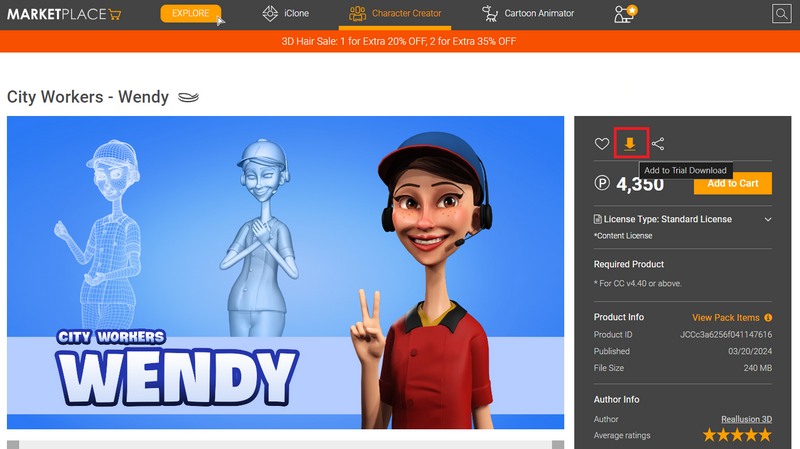
If you see the download arrow mark, then that means you can free download to try.
Please log into your member account, and click the arrow mark to put the content to the Trial Download List. You can put several items to the download list and then download them together. Please note, everyone can download 10 trial items and 3 trial packs a day.
Click the arrow mark on the top navigation to view the Trial Download List.
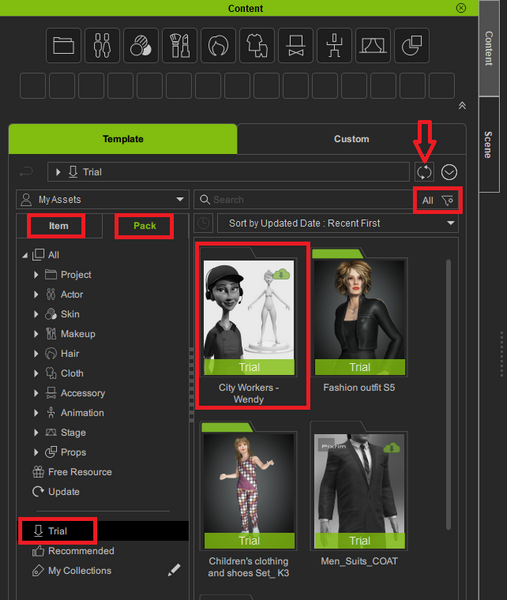
Refresh your Smart Content Manager, then search your Trial content to download.
Kindly also refer to the below FAQ for more info about Content Store & the Marketplace:
1. What is the difference between the Content Store, Marketplace and ActorCore?