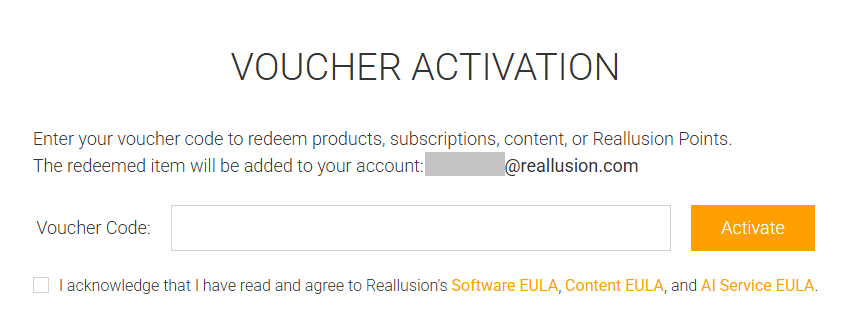
Go to the DA / Bonus Points Voucher Redeem page at https://www.reallusion.com/voucher/default.html?type=2.
Login to your Reallusion member account. If you don’t have an account yet, please create an account first and then you can activate your voucher.
Copy and Paste the voucher code in the column, and check the check box. Then click the activate button.
For any redeem issue, please contact our Support Team.
More info: 1. Where to check my Bonus Points History and how to use Bonus Points to buy products in the store?

How to redeem a Content Voucher:
2. How do I redeem a Content Voucher?
Go to the Content Activation Page at https://www.reallusion.com/voucher/default.html?type=1.
Login with your Reallusion Member Account. If you don’t have one, then click on Sign Up to register a new account.
Copy and Paste the voucher code in the column. Then click the activate button.
You will then see a message indicating a successful activation. If not, then please check to see if there is any space before or after the voucher code you pasted. You may also contact support for further assistance.
Once you have successfully activated the voucher, then click on the download link found in your member account member account under "Order History" page to check.
After redemption, you can download the content redeemed through a content voucher from the Smart Content Manager.
https://www.reallusion.com/iclone/content.html#content-management

How to redeem a DA / Bonus Points Voucher:
1. How can I redeem DA / Bonus Points Voucher?